


Antminer A3 815Gh specs: Blake2B mining setup guide
Views: 0 Author: Site Editor Publish Time: 2026-06-26 Origin: Site


The Bitmain Antminer A3 stands as a historically significant piece of hardware in the cryptocurrency landscape. Built exclusively for the Blake2B algorithm, it rapidly centralized mining power on the Siacoin network upon release. Its introduction shifted the entire ecosystem away from general-purpose graphics cards toward specialized silicon.
However, fluctuating network difficulties and the sheer age of the machine present a complex operational dilemma today. Operators often struggle to determine if deploying this unit remains financially viable. Improper configuration also risks catastrophic hardware failure if you ignore thermal and electrical limits. You need concrete data to make informed deployment decisions.
We will explore these challenges by examining pragmatic, data-driven specifications and inherent operational risks. You will discover exactly how to evaluate hardware health before deployment. Finally, we provide a verified step-by-step setup guide. This guide ensures you configure your hardware safely, maintain optimal uptime, and maximize efficiency.
Key Takeaways
Hardware Realities: Delivers ~815 Gh/s at a stated 1275W, though real-world wall power often fluctuates higher.
Target Algorithm: Exclusively mines Blake2B; hard-tied to specific network ecosystems (like Siacoin) and susceptible to network forks.
Infrastructure Needs: Requires 220V power, an APW3++ (or equivalent) power supply, and commercial-grade acoustic/thermal management.
Profitability Lens: Success is entirely dependent on sub-$0.05/kWh electricity costs and current Blake2B coin market cycles.
Bitmain A3 Specifications: Evaluating the 815Gh Miner
Understanding official benchmarks provides a baseline for evaluating the 815gh miner. Bitmain advertises an exact hash rate of 815 Gigahashes per second. However, you rarely see this precise number on your pool dashboard. Real-world conditions introduce variance. Pool reporting mechanisms average out your submitted shares over time. You should expect a natural fluctuation of ±5% during daily operations. Network latency also impacts the effective hash rate recorded by your chosen pool.
Power consumption directly dictates your operational baseline. The unit draws 1275W under ideal laboratory conditions. Real-world wall power often exceeds this figure. Older power supplies lose efficiency. Hotter environments force cooling fans to draw more current. We calculate the baseline efficiency at approximately 1.56 Joules per Gigahash (J/GH). This metric allows you to compare the unit against newer generations of hardware. Lower J/GH ratios mean higher efficiency.
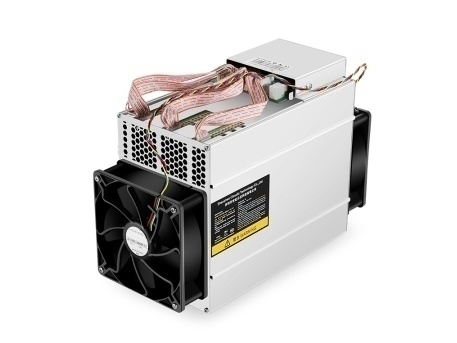
Physical footprint and environmental thresholds demand strict adherence. The machine utilizes a standard dual-fan, tube-like form factor. It weighs roughly 4.2 kilograms. You must respect the strict operating temperature range of 0°C to 40°C. Operating outside this window rapidly degrades internal silicon. Humidity limits are equally important. You must keep non-condensing humidity between 5% and 95%. High moisture levels accelerate hashboard oxidation. Oxidized traces lead to dead chips and permanent hash rate loss.
Specification Parameter | Official Rating | Real-World Expectation |
|---|---|---|
Hash Rate | 815 Gh/s | 775 - 855 Gh/s (±5%) |
Power Draw | 1275W | 1300W - 1350W (at the wall) |
Efficiency | 1.56 J/GH | ~1.65 J/GH (aging components) |
Temperature Limit | 0°C to 40°C | Keep ambient below 25°C |
ROI Framework & Profitability Assumptions
You cannot deploy an antminer a3 miner without a stringent profitability framework. Electricity costs act as the ultimate gatekeeper. Operators must secure sub-$0.05/kWh electricity rates. Standard residential power grids simply charge too much. If you pay typical consumer rates, your operational expenses (OPEX) will heavily outpace your coin yield. You will operate at a guaranteed daily loss. Renewable energy sources often provide the only viable path forward. Solar or stranded hydro-power setups work best.
Network difficulty acts as a dynamic variable affecting daily yield. As more machines enter a specific network, the difficulty adjusts upward. The Blake2B algorithm historically experienced massive difficulty spikes. These spikes occurred because specialized hardware saturated the network. When difficulty rises, your fixed 815 Gh/s earns fewer coins each day. You must monitor network charts closely. A sudden influx of newer generation machines will crush the profitability of older units.
Hardware depreciation adds another layer to your calculations. An older asic miner carries a very low second-hand market value. You must view the hardware purchase as a sunk cost. Do not expect to resell the machine later to recover your initial capital expenditure. Frame your return on investment around the generated coin yield against your daily OPEX. The hardware value will likely reach zero. Your profit comes solely from the margin between power costs and token value.
Network Difficulty State | Daily Coin Yield | Profitability Impact (at $0.05/kWh) |
|---|---|---|
Low (Bear Market / Few Miners) | High | Positive cash flow likely. |
Medium (Steady Growth) | Moderate | Break-even or marginal profit. |
High (Bull Market / Saturated) | Extremely Low | Negative cash flow. Turn off unit. |
Implementation Risks & Buyer Due Diligence
Historical reliability data reveals critical vulnerabilities. Community feedback often highlights intense operational noise. The cooling fans consistently push past 75 decibels. This acoustic footprint mimics a commercial vacuum cleaner. It makes the unit entirely unsuitable for residential spaces. Heat exhaust presents another major challenge. The machine displaces a massive amount of thermal energy. Improper ventilation causes heat to loop back into the intake. This looping accelerates specific hashboard degradation over time.
Algorithm centralization creates inherent network risks. The tension between general hardware enthusiasts and specialized hardware manufacturers remains high. Deploying a dedicated blake2b miner ties your investment to a single ecosystem. If a network community decides to execute a hard fork to reject specialized hardware, your machine becomes obsolete instantly. It cannot be reprogrammed to mine different algorithms. You must monitor developer proposals within the relevant coin communities to anticipate these forks.
Sourcing these units requires extreme caution. You will almost exclusively buy from the second-hand market. Used hardware carries hidden defects. You must verify the operational integrity of the machine before finalizing any transaction. Ask the vendor for specific proofs of performance. Protect your capital by following a strict evaluation protocol.
Request a continuous 24-hour pool log to verify stable hash rates.
Demand clear photos of the physical hashboards to check for PCB burn marks.
Verify the fan RPM logs to ensure cooling mechanisms operate smoothly.
Check the controller board for signs of corrosion or dust buildup.
Ask for a short video showing the machine booting up and initializing.
Step-by-Step Antminer A3 Miner Setup Guide
Proper configuration prevents hardware damage and ensures stable operations. You must follow a methodical approach to deploy your antminer a3. Rushing the physical setup often leads to burnt power connectors.
Phase 1: Physical Infrastructure & Powering Up
Inspect the unit for any loose heatsinks. Gently shake the machine. Listen for rattling inside the aluminum casing.
Connect the PCIe power cables to the hashboards. You will need a high-quality power supply. The APW3++ is the standard choice. Ensure every single 6-pin connector clicks securely into place.
Connect the final PCIe cable to the controller board. Never mix cables from different power supplies on the same hashboard.
Plug in a standard RJ45 Ethernet cable. Avoid using Wi-Fi repeaters. Wireless bridges introduce latency and increase rejected shares.
Power on the PSU. The fans will immediately spool up to maximum speed. This loud sequence is a normal part of the boot process.
Phase 2: Network Discovery
Wait approximately two minutes for the controller to assign an IP address via DHCP.
Open your computer connected to the same local network. Download and run the IP Reporter utility.
Press the physical "IP Report" button on the front panel of the miner for three seconds.
The software will display the local IP address on your screen. Alternatively, check your router's DHCP client list to find the device.
Type this IP address into your web browser. Enter the default credentials. The username is "root" and the password is "root".
Navigate immediately to the administration tab. Change the default password to secure your hardware against local network intrusions.
Phase 3: Blake2B Pool Configuration
Click on the Miner Configuration tab in the web interface.
Locate the pool settings area. You will see fields for Pool 1, Pool 2, and Pool 3.
Input the primary Stratum URL provided by your chosen pool into the first field.
Enter your designated Worker Name. This usually combines your pool account name and a worker ID.
Input the password. Most modern pools simply require "x" or leave it blank.
Fill out Pool 2 and Pool 3 with failover addresses. These secondary pools keep your machine earning if the primary server goes offline.
Click "Save & Apply". The machine will restart its mining software and begin hashing within minutes.
Maintenance & Troubleshooting Operations
Routine monitoring separates successful deployments from hardware failures. You must learn how to read the Miner Status interface. This dashboard provides real-time diagnostics. Look at the hardware (HW) error column. A small number of HW errors is normal during continuous operation. Acceptable error rates hover around 0.03% of total submitted shares. If you see thousands of errors appearing within an hour, you have a problem. High error rates usually indicate severe heat issues or failing silicon chips.
Thermal management requires constant vigilance. Proper airflow separation dictates your success. You must separate the cold intake air from the hot exhaust air. If hot exhaust cycles back into the intake fans, ambient temperatures will skyrocket. Check the ASIC chip temperatures in the web dashboard. Keep chip temperatures strictly below 80°C. Lower temperatures prolong the lifespan of the hardware. If temperatures exceed 85°C, the bitmain a3 will likely reboot automatically to protect itself.
Firmware management directly impacts your operational efficiency. Bitmain provides stable factory releases. Factory firmware ensures maximum compatibility and baseline stability. However, advanced operators sometimes flash custom firmware. Custom firmware allows for granular under-volting. Under-volting lowers power consumption while maintaining hash rates. This modification improves your J/GH efficiency. We recommend sticking to factory firmware for your first month. Only experiment with custom flashes once you fully understand the machine's baseline thermal behavior.
Conclusion
Deploying specialized legacy hardware requires precision and highly specific environmental conditions. The ideal deployment scenario today involves hobbyists with access to free solar energy. Large institutional setups with extreme low-cost energy agreements also benefit from these machines. If you pay standard retail electricity rates, the mathematical reality heavily favors turning the machines off. You must respect the strict thermal limits and acoustic realities of the hardware.
Before making any financial commitments, run current market metrics through a reliable profitability calculator. Input your exact kilowatt-hour costs and monitor current network difficulty trends. If the numbers validate your strategy, proceed confidently. If you already have the hardware on hand, execute the physical and network setup steps precisely. Secure your infrastructure, manage your heat exhaust, and monitor your error rates daily.
FAQ
Q: What power supply do I need for the Antminer A3?
A: You need a commercial-grade unit like the APW3++ or a reliable third-party 1600W+ Gold-rated equivalent. These power supplies require a 220V electrical circuit to achieve their maximum output. Running them on 110V circuits restricts wattage limits and causes system instability.
Q: Can the Bitmain A3 mine Bitcoin?
A: No. It operates exclusively on the Blake2B algorithm. Bitcoin utilizes the SHA-256 algorithm. You cannot reprogram or flash the hardware to mine different cryptographic structures. It is strictly limited to ecosystems like Siacoin.
Q: How loud is the Antminer A3 815Gh miner?
A: The cooling fans generate between 70 and 75 decibels of constant noise. This volume resembles a running leaf blower or industrial vacuum. It disrupts conversations and makes the machine entirely unsuitable for apartments, bedrooms, or typical residential living spaces.
Q: How do I reset my Antminer A3 to factory settings?
A: Keep the machine powered on. Locate the small physical reset button near the Ethernet port. Use a pin to press and hold this button for ten seconds. The control board lights will flash. The machine will reboot and restore all default IP and login settings.

Shenzhen OB Technology Co., Ltd. We are leading manufacturer in China which specialized electronic products supplying for 10 years.
SHOP
Graphics Cardadaphics
SUPPORT
Subscribe to receive updates, access to exclusive deals, and more.
